
How to Submit Online Photographs
| PLEASE NOTE: These instructions are for ONLINE STUDENTS ONLY!! DO NOT SUBMIT PHOTOGRAPHS unless you are enrolled in an online class |
Submitting an online photograph to us is easy. You simply need to follow the following guidelines in order to submit the proper identification photo to us to use with your training record:
ALL PHOTOGRAPHS MUST BE IN THE FOLLOWING FORMAT TO BE ACCEPTABLE:
- The photograph must be in “.JPG”, “.JPEG” or “.PNG” format.
- The photograph MUST be IN COLOR AND HAVE A PLAIN WHITE BACKGROUND (see example below)
- The photograph MUST be FULL SIZE (DO NOT CROP THE PHOTO OR CHANGE ITS SIZE).
- The photograph MUST CLEARLY SHOW YOUR FULL FACE (NO head coverings or glasses).
- You MUST be FACING FOWARD AND DIRECTLY AT THE CAMERA (NO side shots or head tilting)
EXAMPLES OF CORRECT/INCORRECT PHOTOGRAPHS:
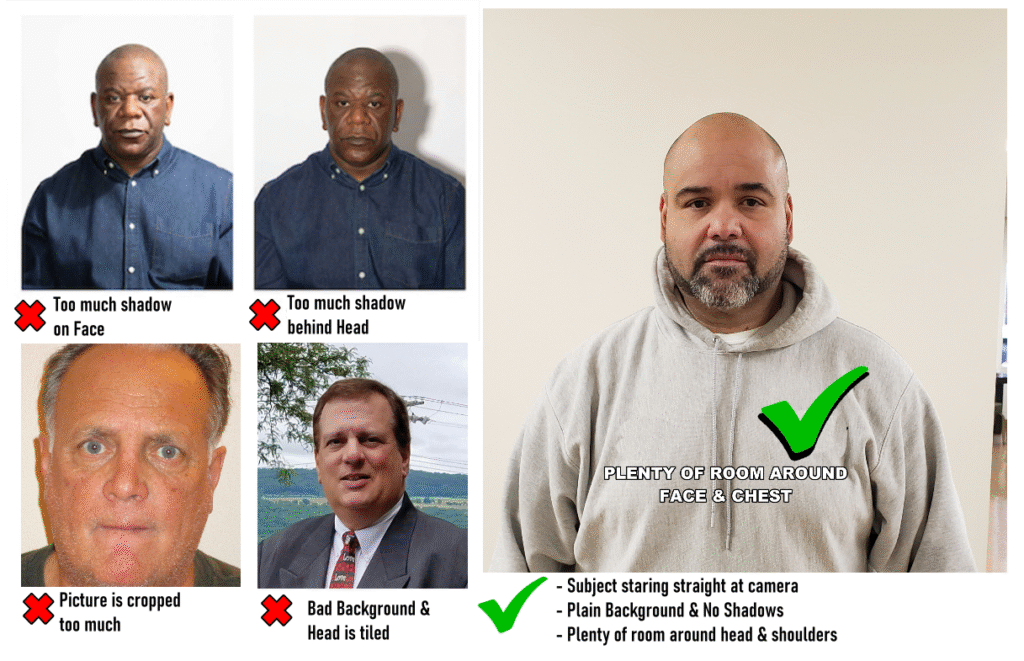
PLEASE NOTE:
- Photographs which DO NOT conform to these requirements CANNOT BE ACCEPTED!
- We CANNOT PROCESS YOUR TRAINING RESULTS UNTIL we receive the correct photograph from you!
- All Student Photographs must be submitted to us by E-MAIL.
- Please include your FULL NAME & APPLICATION ID NUMBER in the e-mail when submitting the photograph.
- Send all photographs to:
Classes@LADDSORATraining.com
AFTER YOU HAVE REGISTERED FOR A CLASS, LOOK FOR AN E-MAIL FROM US
(either from Classes@LADDSORATraining.com OR LADDSORATraining@gmail.com)
THIS E-MAIL WITH HAVE THE ZOOM LOGIN INFORMATION AND A LINK TO SUBMIT THE PHOTOGRAPH